 Bong 69
HUB75 Bridge
A 4-port gigabit Ethernet controller for HUB75 LED panels. It takes DDP from xLights, our free DDP Streamer or any other DDP sender, and shows it on a wall of panels.
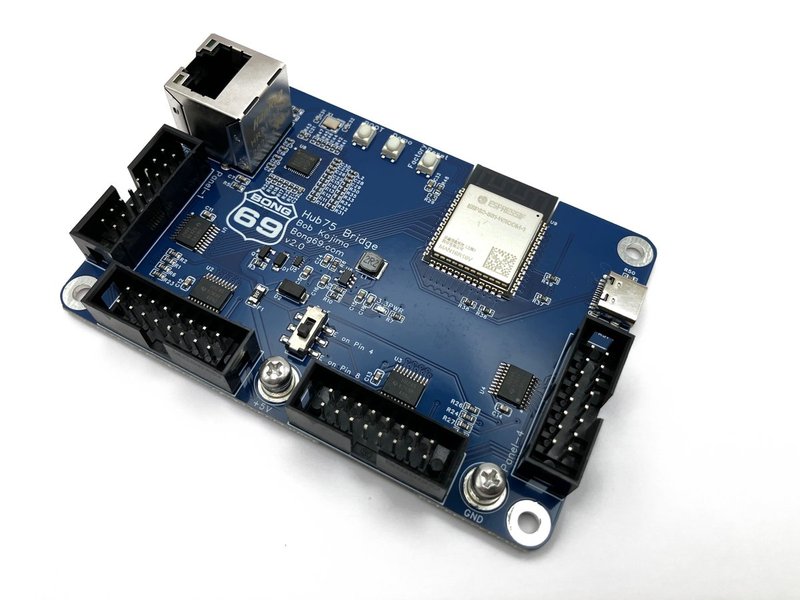
Board v2.0
- 4 HUB75 ports, gigabit Ethernet (wired only, no Wi-Fi)
- 16 panels (64 × 64) at 60 fps, or 24 panels at 40 fps
- 11-bit color with a CIE brightness curve: smooth fades and dark shades
- Everything is set up from a web page: panel size, panel map, color order per port, brightness, password
- A panel test shows each panel's port and position right on the wall, so wiring mistakes are easy to spot
- Built-in demos: press the Demo button to check your panels without a computer
- Firmware updates from the web page, settings backup and restore
Works with
- xLights: add it on the Controllers tab as a DDP controller
- Our free DDP Streamer: videos, your screen or a camera, and one picture across several bridges
- Anything else that sends DDP (UDP port 4048)
Panels
Indoor HUB75 panels: 32 × 16, 32 × 32, 64 × 32, 64 × 64, 128 × 32 and 128 × 64. A switch picks pin 8 or pin 4 for the E line of 64 × 64 panels. Panels must scan at half their height (1/8 for 32 × 16, 1/16 for 32-tall, 1/32 for 64-tall) and use plain shift-register driver chips (ICN2037, FM6124, DP5020 and similar). Not supported: most outdoor panels (lower scan rates), 1/64-scan panels, and panels with PWM driver chips (ICN2153, MBI5153, FM6363; listings often say "3840 Hz"). The setup guide has a checklist. The Wall Planner shows the refresh and frame rate for your wall before you buy panels.
See it in action
One PC streaming video to three walls at 60 fps
Spanning 3 displays with 3 different pitch sizes
The built-in demos
Specifications
| Board | v2.0, 95 mm × 65 mm |
|---|---|
| Processor | ESP32-S31 (dual-core RISC-V), 16 MB flash, 16 MB PSRAM |
| Network | Gigabit Ethernet (RJ45), DHCP or fixed IP, mDNS. Wired only: no Wi-Fi |
| Protocol | DDP (UDP port 4048) |
| Outputs | 4 × HUB75 (5 V level shifted) |
| Most panels | 16 × 64×64 at 60 fps, 24 at 40 fps |
| Color | up to 11-bit per channel, CIE or gamma 2.8 curve |
| Power | 5 V on the binding post, or USB-C |
| Buttons | Demo, Reset (hold 3 s = factory settings), Boot |
What's included
- 1 × HUB75 Bridge board v2.0, tested, in an antistatic bag
Not included: LED panels, HUB75 ribbon cables, 5 V power supply, Ethernet cable.
What you need
- HUB75 LED panels and their ribbon cables
- A 5 V power supply for the panels. The board takes 5 V on its binding post (from the same supply) or from USB-C.
- An Ethernet connection
- xLights, the DDP Streamer, or another DDP sender
Getting started
A new board is at http://hub75bridge.local: open it in a browser on the same network, or press Demo and the first demo shows the board's IP address. When you use more than one HUB75 Bridge, give each board its own name in Settings. The setup guide and FAQ on GitHub covers the quick start, xLights setup, the panel map and troubleshooting.
Firmware updates are on the board's own web page. If a board won't start, connect it with a USB-C cable and use the web installer in Chrome or Edge.
12-hour test
Three v2.0 boards ran for 12 hours at the same time with no stalls, tears or reboots:
- 16 panels (4 × 4, 64 × 64) at 60 fps: 59.9 fps average, 2.59 million frames
- 24 panels (4 × 6, 64 × 64) at 40 fps: 39.9 fps average, 1.73 million frames
- 9 panels (3 × 3, 64 × 32) at 60 fps: 59.9 fps average, 2.59 million frames
Tested before it ships
At start-up the firmware checks every HUB75 signal for shorts and stuck pins. Then each board goes on our test fixture: gigabit Ethernet link, the test picture on all 4 ports, both buttons. It ships reset to factory settings.
Free brackets
Panel brackets are free to print on Printables: P2 64 × 64 brackets and P2.5 64 × 32 brackets. A mount for the board is in the same listings.